
Most underwriting models break at the same place: rent estimates.
The purchase price is locked in. The financing terms are set. And expenses? Most are well-documented and easy to obtain like insurance quotes and tax records. But rent estimates from public sources are frequently unreliable. And if the rent number feeding the model is wrong, every output is wrong.
It’s been widely reported that Zillow’s Rent Zestimate lags real market conditions. The alternative, manual comp-pulling, takes hours and produces numbers you can’t refresh at scale. And when you’re running hundreds of potential investment properties through an underwriting model, “hours” isn’t a workflow, it’s a bottleneck.
The Mashvisor Rental Rates API solves this at the data layer. One endpoint returns LTR and STR rent estimates by bedroom count, sourced from 12 months of real comparable listings, for any neighborhood, city, or zip code in the US. Here’s what the endpoint returns, how to call it, and where different product teams are putting it to work.
Key Takeaways
- The Mashvisor Rental Rates API endpoint is `GET /v1.1/client/rental-rates` and returns rent estimates for studios through 4-bedroom properties.
- You can switch between long-term (`traditional`) and short-term (`airbnb`) estimates using the `source` parameter.
- Each response includes median, min, max, average, sample count, and an `adjusted_rental_income` field.
- For STR estimates, the response also returns `median_night_rate` and `median_occupancy` per bedroom tier.
- Primary use cases: DSCR lender underwriting, property management rent-setting, iBuyer cashflow modeling, and portfolio benchmarking.
- Full API documentation can be found here.
The API Request
Authentication is via API key passed in the request header. All requests go to Mashvisor’s base API URL with HTTPS.
```bash curl -G "https://api.mashvisor.com/v1.1/client/rental-rates" \ -d "state=TX" \ -d "city=Austin" \ -d "source=traditional" \ -H "x-api-key: YOUR_API_KEY" ```To target a specific neighborhood rather than the full city, pass the Mashvisor neighborhood ID in the `neighborhood` parameter. To target by zip, use `zip_code`. You can get neighborhood IDs from the Search endpoint. For most underwriting workflows, you’ll want neighborhood or zip-level precision. City-level averages are useful for market overview pages but too broad for deal-by-deal analysis.
Switching to STR estimates is a single parameter change:
```bash curl -G "https://api.mashvisor.com/v1.1/client/rental-rates" \ -d "state=TX" \ -d "city=Austin" \ -d "source=airbnb" \ -H "x-api-key: YOUR_API_KEY" ```What the Rental Rates Endpoint Returns
The endpoint is straightforward. You pass a location (state is required; city, neighborhood ID, or zip code narrow the results), and a `source` value of either `traditional` or `airbnb`. The response comes back as a JSON object with two main blocks.
The first block is `retnal_rates` (note: that’s the exact field name in the API response). It gives you a single median value per bedroom tier: studio, 1-bed, 2-bed, 3-bed, and 4-bed. These are your headline estimates. They’re the numbers you’d use for quick comparisons or to populate a dashboard field.
The second block is `detailed`. It’s an array that breaks down each bedroom tier with full distribution data: min, max, average, median, count, and the `adjusted_rental_income`. That last field is important. For LTR, it can be used as a more conservative rent estimate. For STR, it reflects occupancy-adjusted monthly revenue based on nightly rate and comparable listing performance. As a result, it may be higher or lower than the raw median value.
For STR requests (`source=airbnb`), each tier in the detailed array also includes `median_night_rate` and `median_occupancy`, so you can reconstruct monthly revenue estimates without needing to call a separate endpoint.
Reading the Response
Here’s a representative response for a California neighborhood (neighborhood ID 117954), traditional rental strategy:
```json { "status": "success", "content": { "retnal_rates": { "studio_value": 2100, "one_room_value": 2500, "two_room_value": 3890, "three_room_value": 4997.5, "four_room_value": 7995 }, "sample_count": 268, "detailed": [ { "state": "CA", "city": null, "neighborhood": "117954", "zipcode": null, "beds": "1", "count": 31, "min": 995, "max": 4500, "avg": 2641.61, "median": 2500, "adjusted_rental_income": 2407.5 }, { "state": "CA", "city": null, "neighborhood": "117954", "zipcode": null, "beds": "2", "count": 136, "min": 1300, "max": 7500, "avg": 3979.90, "median": 3890, "adjusted_rental_income": 3746.07 }, { "state": "CA", "city": null, "neighborhood": "117954", "zipcode": null, "beds": "3", "count": 78, "min": 645, "max": 12000, "avg": 5288.96, "median": 4997.5, "adjusted_rental_income": 4812.59 } ] } } ```What each field means:
- `median`: The midpoint rent across comparable active listings. This is the most stable estimate meaning it’s less sensitive to outliers than the average. Use this as your baseline.
- `avg`: The mean rent across comps. Often higher than the median because luxury outliers pull it up. Useful for context but not for conservative underwriting.
- `adjusted_rental_income`: For LTR, it’s the median estimate minus a vacancy adjustment. For the 1-bed above, that’s $2,500 median adjusted down to $2,407.50. For STR, it’s the median adjusted for occupancy and nightly rate of comparables. This is the field most DSCR lenders and cashflow models should be using because it’s closer to what the property will actually produce month over month.
- `count`: How many comparable listings fed this estimate. A count of 136 for 2-beds is a large, reliable sample. A count of 7 for studios means the estimate is directional at best.
- `sample_count` (top-level): Total comparable listings across all bedroom tiers for this location.
- `min` / `max`: The range helps you understand market spread. A 2-bed ranging from $1,300 to $7,500 tells you location quality and unit condition matter a lot in this market so median alone won’t capture that.
STR Response: The Extra Fields
For the `source=airbnb` call, each bedroom tier in `detailed` adds:
- `median_night_rate`: The median nightly rate for active STR listings of that bedroom count in the area.
- `median_occupancy`: The median occupancy rate (expressed as days booked per month in some markets, or as a percentage depending on the data vintage).
These two fields let you calculate monthly STR revenue directly from the rental rates endpoint without a separate call to the Investment Analysis or Short Term Rentals endpoint:
Monthly STR Revenue = median_night_rate × (median_occupancy / 100) × 30
If you’re building a rental strategy comparison screen (LTR vs STR side by side), this endpoint alone gives you most of what you need for the revenue column.
How Development Teams Are Using This Endpoint
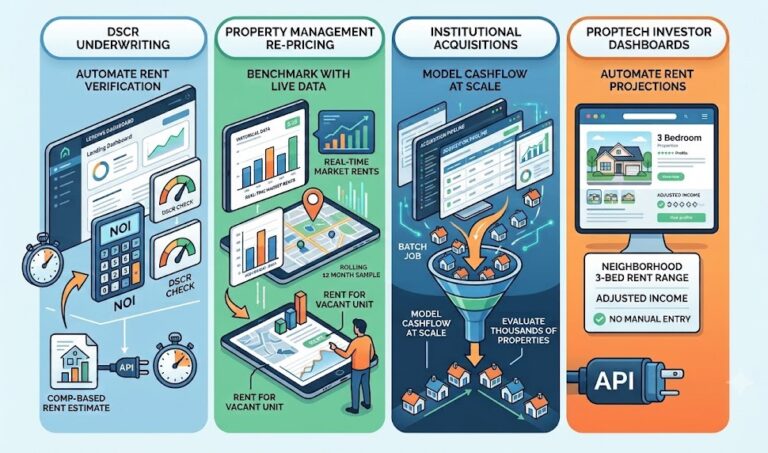
DSCR lenders and mortgage platforms use the traditional estimate to automate rent income verification in underwriting workflows. Instead of ordering a rental income appraisal for every loan, the API call returns a comp-based estimate in milliseconds. The `adjusted_rental_income` field feeds directly into the NOI calculation, which then drives the DSCR check.
Property managers setting rent for new units or re-pricing vacant units use the neighborhood and zip-level call to benchmark against what similar units are actually renting for right now, not what they rented for six months ago. The 12-month rolling sample keeps estimates current as markets move.
iBuyers and institutional investors running large acquisition pipelines use the rental rates feed to model cashflow at scale. When you’re evaluating a thousand properties, you can’t manually research rent for each one. The API makes rent estimation a batch job.
PropTech platforms building investor dashboards use the bedroom-tiered estimates to populate rent projections on listing pages. A user looking at a 3-bed property sees the neighborhood’s 3-bed rent range and adjusted income automatically. No manual entry required.
If your platform currently handles rent estimates differently, let’s talk data partnership.
Tips for Getting the Most Accurate Estimates
Use the lowest geography you have. Neighborhood-level or zip-level estimates are meaningfully more accurate than city-level. A city average blends luxury downtown units with suburban ranchers which isn’t very useful for pricing a specific property.
Check the sample count. The `count` field in each bedroom tier tells you how many comps exist. For small or rural markets, you might get 5-10 comps for a 4-bed tier. That’s a directional signal, not a precise estimate so be sure to factor that into how you display or use the number.
Use `adjusted_rental_income` as your baseline, not `avg`. The average gets pulled up by outliers. The adjusted income field is a conservative, vacancy-corrected figure. For underwriting, conservative is better than optimistic.
Pair it with the Investment Analysis endpoint for full deal economics. The Rental Rates endpoint gives you the revenue input. The Investment Analysis endpoint runs the full deal: cap rate, cash-on-cash return, operating expenses, and occupancy. Together they give you the complete picture. See the full endpoint documentation here.
Bottom Line
Rent estimates are the load-bearing wall of any rental property investment model. If the rent number is wrong, every downstream metric is wrong: cashflow, cap rate, DSCR, and the go/no-go decision itself.
The Mashvisor Rental Rates API gives developers and platforms a single endpoint that returns comp-based, bedroom-tiered, vacancy-adjusted rent estimates for both LTR and STR strategies — for any US address, refreshed nightly, in JSON.
It’s not a complement to your underwriting model. It’s the input that makes your underwriting model trustworthy. If you’re building investment tools, lender platforms, or rental analytics products, this is where you start.
Start exploring the Mashvisor data API or read the full endpoint docs.
FAQ: Rental Rates API
What does the Mashvisor Rental Rates API return?
The Rental Rates API returns estimated monthly rent by bedroom count (studio through 4+ bedrooms) for a given location. Each estimate includes median, average, min, max, sample count, and a vacancy-adjusted income figure. For STR requests, it also returns median nightly rate and median occupancy per bedroom tier.
Can I get both long-term and short-term rental rate estimates from the same endpoint?
Yes. The `source` parameter controls which strategy the estimates reflect. Pass `source=traditional` for long-term rental comps or `source=airbnb` for short-term rental estimates. Both calls hit the same endpoint: `GET /v1.1/client/rental-rates`.
How current is the rental rate data?
Estimates are based on 12 months of historical performance for comparable active or recently active listings in the target area. Mashvisor updates its data nightly, so estimates reflect recent market conditions rather than stale comps.
How specific can I get with location targeting?
You can target by state (required), city, neighborhood ID, or zip code. Neighborhood-level or zip-level queries return more precise estimates than city-level. Neighborhood IDs can be retrieved using Mashvisor’s Search endpoint.
How does Mashvisor’s Rental Rates API differ from other providers?
AirDNA focuses on STR-specific metrics and doesn’t provide long-term rental rate estimates. Zillow’s Rent Zestimate is a consumer-facing estimate embedded in listing pages, not a self-serve developer endpoint — Zillow retired its public consumer API, and current access to Zestimate data runs through Bridge Interactive, a partner program that requires applying for access and getting approved. Mashvisor’s endpoint covers both LTR and STR strategies, returns bedroom-tiered estimates with distribution data, and is structured for programmatic integration. For a deeper comparison, read Best Real Estate Data API: Mashvisor, AirDNA, Zillow.
What’s the difference between `median` and `adjusted_rental_income` in the response?
The `median` is the midpoint rent across all comparable listings for that bedroom tier. The `adjusted_rental_income` applies a vacancy adjustment to that median, producing a more conservative monthly income estimate. For underwriting and cashflow modeling, `adjusted_rental_income` is the safer number to use.
Mashvisor provides long-term and STR data for real estate investors and PropTech developers across the US. Explore the full API here.






 English (US) ·